Drive Chrome from .NET. Share the journeys.
A small DevTools Protocol client with no dependencies beyond the BCL, and synthetic journeys: plain
text files in agent-browser's command language that replay in agent-browser, in dotnet test, on
Playwright and Elastic Synthetics, and from the cdp command line. Screenshots, accessibility audits, Web Vitals, link checks and HAR
recording are one line each.
# From the shop to the about page
open /
find label Search fill lamp
find role link click --name "About us"
snapshot -c -s main
links
a11y
-- journeys/about.journey:5: snapshot -c -s main
--- PAGE_CONTENT nonce=1c7f…824d origin=http://localhost:5000 ---
url: http://localhost:5000/about.html
- main
  - heading "About us" [level=1]
  - paragraph
    - StaticText "We sell fixtures."
  - link "Back home"
--- END_PAGE_CONTENT nonce=1c7f…824d ---
-- journeys/about.journey:6: links
links: 1 checked, 0 broken
-- journeys/about.journey:7: a11y
violations: 0
ok journeys/about.journey: 6 steps, 3 checkpoints
Built in, one line each
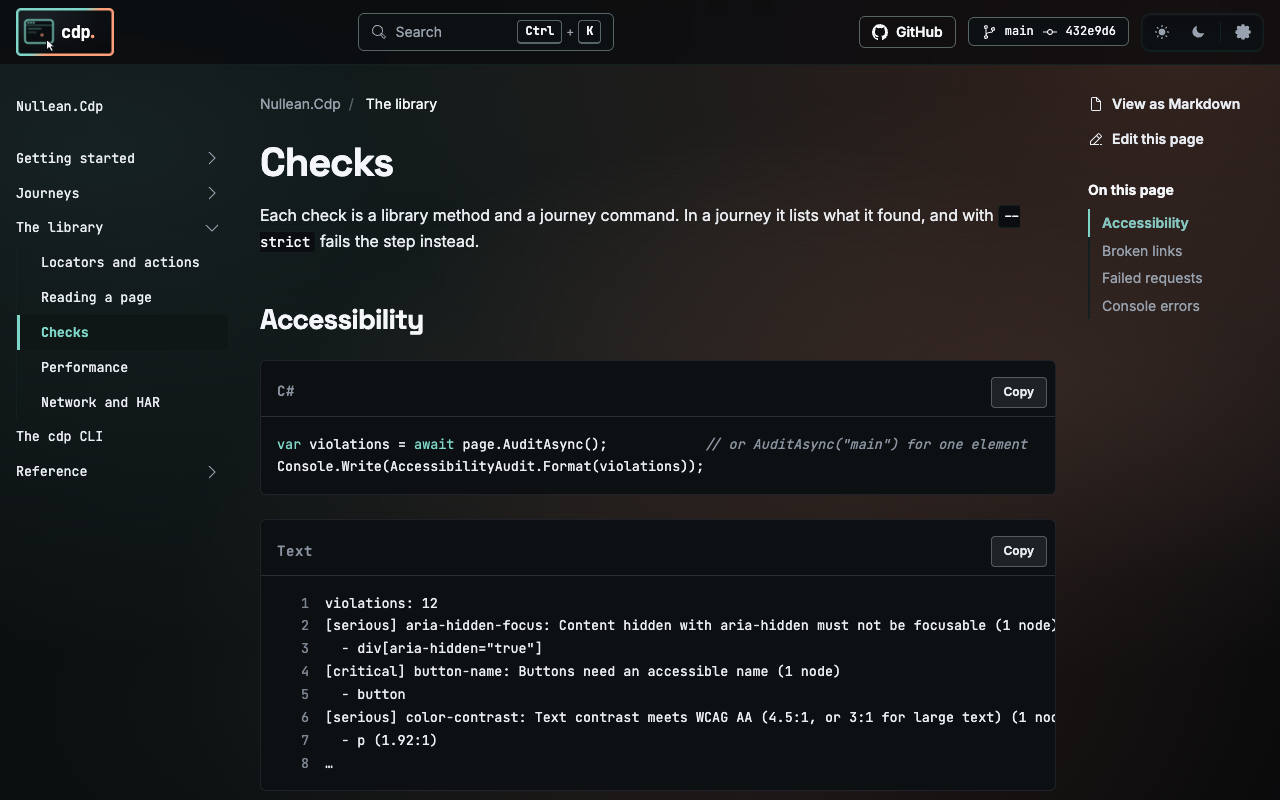
Every check is a journey command and a library method, with no third-party engine. The output below is real.
Twelve rules on Chrome's accessibility tree and the DOM: names for images, buttons, links and fields,
heading order, landmarks, WCAG AA colour contrast, lang, titles, duplicate ids. Named like
axe-core's, so results read alike.
a11y
violations: 12
[serious] color-contrast: Text contrast meets WCAG AA (4.5:1, or 3:1 for large text) (1 node)
  - p (1.92:1)
[critical] image-alt: Images need alternative text (alt), or alt="" when decorative (1 node)
  - img[src="photo.png"]
[moderate] heading-order: Heading levels go down one at a time (1 node)
  - h3
…
LCP with its element, CLS in session windows, INP from 16 ms interactions, first paint, FCP, TTFB, load, and Chrome's runtime counters. Raw numbers, or budgets that fail the step.
Performance →vitals ttfb: 0.3ms fcp: 40ms lcp: 40ms cls: 0.1924 vitals --budget lcp=2500 cls=0.1 # the step fails with: Over budget: cls 0.1924 > 0.1.
Every link on the page, checked by the browser outside the page: no CORS, nothing the page script sees.
Same-site by default; other sites with --external, and only those the allow list permits.
links
links: 2 checked, 1 broken, 2 on other sites not checked (--external)
404 /missing-page
links --strict
# the step fails with:
1 broken link(s):
404 http://localhost:5000/missing-page
PNG files from a journey, the library or the CLI. Below: cdp screenshot https://cdp.nullean.net/library/checks/ -o checks.png.
screenshot shots/home.png --full
screenshot "#basket" shots/basket.png
Every request with its status, filtered by URL, type, method or status; --failed for 4xx, 5xx
and requests with no answer. HAR 1.2 with per-phase timings for a waterfall, credentials redacted.
network requests --failed
GET http://localhost:5000/missing.png (Image) 404
network har start
find role button click --name "Pay"
network har stop checkout.har
Collected from the moment a page opens, each error with the line and column it came from. In a snapshot
test, an errors list that stops being empty is a failure.
console
[info] loaded
errors
Error: rejected (http://localhost:5000/console.html:3:48)
Visible, enabled, text, value, attribute, class, count, title and URL, negated with --not.
Each one keeps checking until it holds or times out, and a failure says what it saw. A passing
assertion records nothing, so verified transcripts do not change.
expect text #count "3 items"
expect --not visible .spinner
# the step fails with:
Timed out after 5s waiting for css #count to have text "3 items": received "2 items".
Each check lists what it found; --strict (or --budget) turns it into a failing step.
Small, direct, safe to share
Talking the DevTools Protocol directly means no Node, no daemon and no third party's output format in the way: one web socket to Chrome, from your process.
Launch or connect to Chrome, isolated contexts per caller, flattened sessions on one socket, lock-free reply routing. AOT and trim clean.
One command per line, written as agent-browser writes it. Export any journey to agent-browser batch JSON and it runs there unchanged.
An allow list on every request, popups included. Secrets by $env: reference and redacted. Page output fenced for agents.
Role, text, label, placeholder, alt, title, test id and CSS. Every action waits for a visible, enabled element and for the navigation it starts.
cdp run, check, batch, snapshot and screenshot, native on Linux, macOS and Windows. A 40-step journey runs in about a second, Chrome's start included.
Nullean.Snapshots runs a journey in dotnet test and compares every checkpoint as a tree, so a failure names what moved.
The journey language
A subset of agent-browser's commands: everything a repeatable test needs, nothing that reaches outside the page it tests.
| Group | Commands | What they do |
|---|---|---|
| Navigate | open, back, forward, reload | relative URLs resolve against the base URL; each waits for load |
| Act | click, fill, type, press, check, select, drag, upload, … | real mouse and keyboard input, after waiting for the element |
| Find | find role|text|label|… [action] --name | agent-browser's semantic locators, no run-specific refs |
| Wait and set | wait, set viewport|media|device|offline|headers|credentials | for an element, text, URL or load state; emulation and headers |
| Read | snapshot, get, is, console, errors | checkpoints: their output is the journey's transcript |
| Check | a11y, links, network requests --failed, timings, vitals | lists by default, --strict or --budget to fail the step |
| Record | screenshot, network har start|stop | files into the artifacts folder the host chose, nowhere else |
A library first
Everything a journey does is a method: launch, contexts, locators, reads and checks. page.SendAsync
reaches any DevTools command the library does not wrap.
dotnet add package Nullean.Cdp
dotnet add package Nullean.Cdp.Journeys
dotnet tool install --global Nullean.Cdp.Cli
# or, without installing:
dnx Nullean.Cdp.Cli chrome
await using var browser = await Browser.LaunchAsync();
await using var context = await browser.NewContextAsync();
var page = await context.NewPageAsync();
await page.GotoAsync("http://localhost:5000/");

await page.Label("Search").FillAsync("lamp");
await page.Role("button", "Go").ClickAsync();
Console.Write(await page.SnapshotAsync(new() { Compact = true }));

var problems = await page.AuditAsync();
var vitals = await page.VitalsAsync();
Also on Playwright and Elastic Synthetics
The same journey file runs as a step-by-step Playwright Test or as a Synthetics browser monitor, through the
@nullean/journeys npm package. Its parser is tested against the .NET one, so a journey that parses
here parses there. What is the same, and what is not
npm install @nullean/journeys
import { journey, step } from '@elastic/synthetics';
import { journeySteps } from '@nullean/journeys/synthetics';

journey('checkout', ({ page, params }) =>
  journeySteps({ page, step, params }, `
    open /
    find label Search fill lamp
    find role button click --name Search --exact
    get text #count
  `, { baseUrl: params.url }));